Process Hacker
Advanced System Monitor & Task Manager
Open-source, transparent, and trusted by developers and system administrators worldwide. Take complete control of your Windows system.
What is Process Hacker?
Process Hacker is a powerful, open-source system monitoring and process management tool designed for Windows. It provides advanced capabilities far beyond the standard Windows Task Manager, offering deep insights into system processes, services, network connections, and resource usage.
Built with transparency and security in mind, Process Hacker gives you complete visibility into what's running on your system. Whether you're a developer debugging applications, a system administrator managing servers, or a power user optimizing performance, Process Hacker delivers the tools you need.
As a comprehensive Windows process monitor and task manager alternative, Process Hacker enables users to monitor CPU usage, memory consumption, disk I/O operations, and network activity in real-time. Unlike the basic Windows Task Manager, Process Hacker provides detailed process information including thread analysis, handle inspection, module viewing, and memory mapping capabilities.
The software serves as an essential system utility for Windows users who need advanced process management features. With Process Hacker, you can identify resource-intensive applications, detect memory leaks, monitor network connections per process, manage Windows services, and terminate unresponsive processes safely. The tool is particularly valuable for system administrators, software developers, and IT professionals who require deeper system insights than what standard Windows tools provide.
Key Features
Discover the powerful capabilities that make Process Hacker the ultimate system monitoring tool
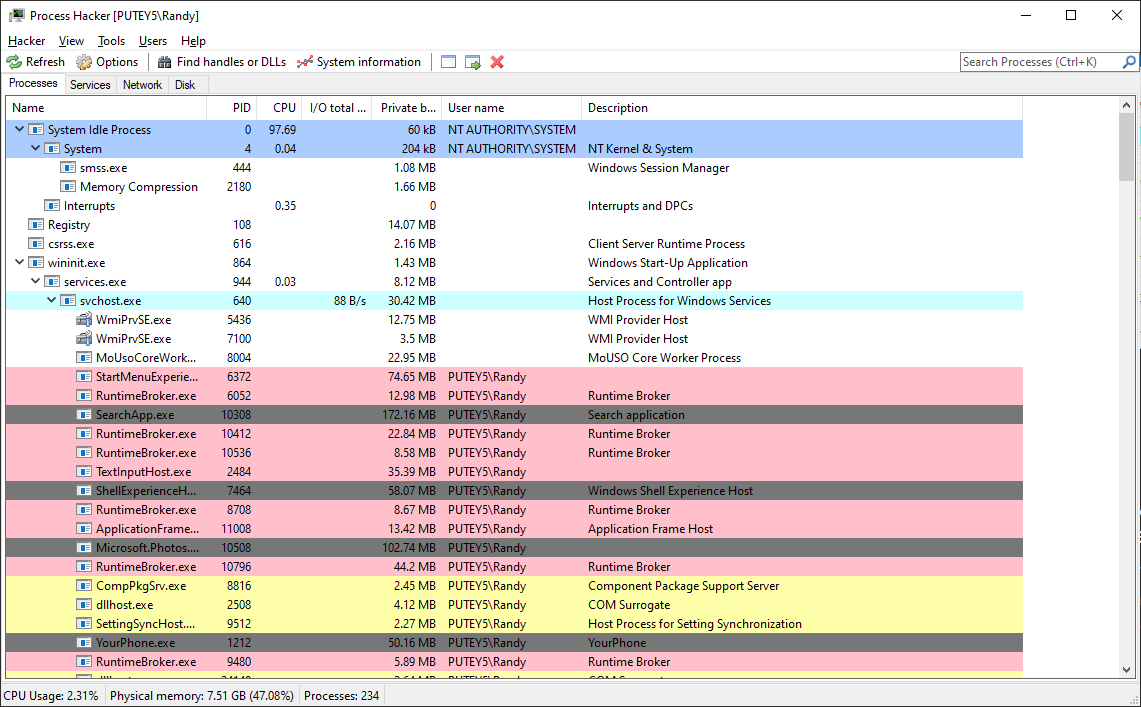
Process Hacker stands out as the premier Windows process manager and system monitor alternative, offering enterprise-grade features for free. The application provides comprehensive process inspection tools that allow users to examine every aspect of running processes, including thread states, memory allocation, loaded DLLs, open handles, and network connections. This level of detail is essential for troubleshooting system issues, optimizing performance, and ensuring security.
Process Inspection
Deep dive into process details, threads, modules, handles, and memory usage with real-time monitoring and filtering capabilities.
Learn moreSystem Monitoring
Comprehensive system resource monitoring including CPU, memory, disk I/O, and network activity with detailed graphs and statistics.
Learn moreAdvanced Permissions
Manage process permissions, terminate stubborn processes, and control system services with elevated privileges and safety checks.
Learn moreWhy Choose Process Hacker?
Superior to Windows Task Manager
While Windows Task Manager provides basic process information, Process Hacker offers a comprehensive suite of advanced monitoring and management tools. The standard Task Manager shows limited details about processes, but Process Hacker reveals everything: thread information, handle counts, memory mappings, network connections, and service dependencies. This makes it the ideal Task Manager replacement for users who need more control and visibility.
Process Hacker's advanced filtering and search capabilities allow you to quickly locate specific processes, services, or network connections. The tool can filter by CPU usage, memory consumption, process name, or custom criteria, making it far more powerful than the basic search functionality in Windows Task Manager.
Essential for System Troubleshooting
Process Hacker is an indispensable tool for system troubleshooting and performance optimization. When your Windows system experiences slowdowns, high CPU usage, or memory issues, Process Hacker helps you identify the root cause quickly. The real-time monitoring capabilities show you exactly which processes are consuming resources, making it easy to pinpoint problematic applications.
The tool's ability to view process trees helps you understand application relationships and dependencies. This is crucial when troubleshooting issues where a parent process spawns multiple child processes. Process Hacker also provides detailed information about services, allowing you to see which services are running, their startup types, and their dependencies on other services.
Network Monitoring and Security
One of Process Hacker's standout features is its comprehensive network monitoring capabilities. Unlike Windows Task Manager, Process Hacker shows you all active network connections per process, including the local and remote IP addresses, ports, protocols, and connection states. This is essential for security analysis, as it helps you identify suspicious network activity or unauthorized connections.
For security-conscious users, Process Hacker provides detailed process security information, including security tokens, privileges, and integrity levels. This allows you to verify that processes are running with appropriate permissions and identify potential security risks. The tool's ability to view process command lines and environment variables also helps in detecting malicious or suspicious processes.
Developer and IT Professional Tools
For software developers and IT professionals, Process Hacker offers debugging and analysis features that go far beyond standard Windows utilities. The tool can display stack traces for threads, show memory regions and their protection attributes, and list all handles opened by a process. This level of detail is invaluable when debugging memory leaks, handle leaks, or performance issues in applications.
Process Hacker's plugin system allows developers to extend functionality and integrate custom tools. The open-source nature means that the codebase is transparent and can be audited for security, making it a trusted choice for enterprise environments. The tool supports exporting process lists and system information to various formats, facilitating reporting and analysis workflows.
Who Uses Process Hacker?
Developers
Debug memory leaks, analyze process behavior, inspect handles and threads, and monitor application performance during development and testing.
- Memory leak detection
- Handle inspection
- Thread analysis
- Performance profiling
System Administrators
Monitor server resources, manage services, troubleshoot system issues, and maintain optimal performance across Windows environments.
- Server monitoring
- Service management
- Resource optimization
- System troubleshooting
Power Users
Take control of your system, identify resource-hungry applications, optimize startup programs, and understand what's running on your computer.
- System optimization
- Startup management
- Performance tuning
- Security analysis
Why Choose Process Hacker?
See how Process Hacker compares to Windows Task Manager
Process Hacker
- Advanced process filtering and search
- Detailed handle and thread inspection
- Network connection monitoring
- Service management and control
- Plugin support for extensibility
- Open-source and transparent
Windows Task Manager
- Basic process list only
- Limited process details
- No network monitoring
- Basic service view only
- No extensibility
- Closed-source
The Complete Solution for Windows System Management
Process Hacker represents the evolution of Windows system monitoring tools. While Windows Task Manager serves basic needs, Process Hacker provides the depth and breadth of features required by power users, developers, and system administrators. The tool's comprehensive approach to process management makes it the definitive Windows process monitor and system utility for anyone who needs more than basic task management.
The open-source nature of Process Hacker ensures continuous improvement and community-driven development. Unlike proprietary alternatives, Process Hacker's source code is available for review, modification, and enhancement. This transparency builds trust and allows users to verify the tool's security and functionality. Whether you're managing a single workstation or an entire network of Windows systems, Process Hacker provides the tools you need to maintain optimal performance and security.
Frequently Asked Questions
Is Process Hacker safe to use?
Yes, Process Hacker is completely safe and legitimate software. It's an open-source Windows system monitor that has been used by thousands of developers, system administrators, and IT professionals worldwide. The source code is publicly available for inspection, and the software contains no malware, spyware, or malicious code. Some antivirus programs may flag it as potentially unwanted due to its advanced system monitoring capabilities, but these are false positives.
How does Process Hacker differ from Windows Task Manager?
Process Hacker provides significantly more features than Windows Task Manager. While Task Manager shows basic process information, Process Hacker offers detailed thread inspection, handle management, network connection monitoring per process, service dependency viewing, memory leak detection, and plugin support. It's designed as a comprehensive Task Manager alternative for users who need advanced system monitoring and management capabilities.
Do I need administrator rights to use Process Hacker?
Process Hacker can run without administrator privileges, but many advanced features require elevated rights. For full functionality including terminating protected processes, viewing detailed process information, managing services, and monitoring network connections, you should run Process Hacker as Administrator. Right-click the executable and select "Run as Administrator" to access all features.
Is Process Hacker free?
Yes, Process Hacker is completely free and open-source. It's released under the GNU General Public License (GPL), which means you can use, modify, and distribute it freely. There are no hidden costs, subscriptions, or premium versions. The software is maintained by a community of developers and contributors who believe in providing powerful system tools at no cost.
Can Process Hacker help with system performance issues?
Absolutely. Process Hacker is an excellent tool for identifying and resolving system performance issues. It shows real-time CPU usage, memory consumption, disk I/O, and network activity per process, making it easy to identify resource-intensive applications. The tool can help you detect memory leaks, find processes consuming excessive CPU, identify network bandwidth usage, and optimize system startup by managing services and startup programs.
Related Resources
Explore Features
Discover all the powerful features that make Process Hacker the ultimate system monitoring tool.
Download Now
Get the latest version of Process Hacker with SHA checksums and digital signatures.
Getting Started
Learn how to use Process Hacker with our comprehensive guides and troubleshooting tips.
Trust & Transparency
Process Hacker is open-source software, meaning you can inspect every line of code. We believe in complete transparency and security. Our source code is publicly available, regularly audited, and trusted by security professionals worldwide.
As an open-source system monitoring tool, Process Hacker's codebase is available for public review and audit. This transparency ensures that users can verify the software's security and functionality. The tool has been reviewed by security researchers, developers, and IT professionals, establishing it as a trusted Windows process manager for enterprise and personal use.
Process Hacker collects no user data, makes no network connections, and operates entirely locally on your system. This privacy-focused approach, combined with the open-source nature, makes Process Hacker an ideal choice for security-conscious users and organizations. The software is regularly updated with security patches and feature improvements, ensuring it remains a reliable and secure system utility for Windows users.
Complete code transparency
100% clean and safe
No hidden costs
Ready to Get Started?
Download Process Hacker today and take complete control of your Windows system
Download Process Hacker